


Using ExecuteAsync/CreateAsync and SDK performance tweaks on the Dataverse SDK for very fast insert, update & delete operations
Oh boy, it’s been a while since I wrote a blog post. I originally wrote this about a year ago and never finished it / released it due to various personal issues at the time stealing all of my time instead. Apologies for the long silence!
In 2023 I was tasked with building out an Azure Function that broke down Excel files uploaded in Dataverse into rows in a table. I learned a lot about the platform and about the Dataverse SDK when building it - namely that database operations can be really, exceptionally slow! I get that Dataverse and the Power Platform are large products, but calls for large amounts of data (some of these Excel files were upwards of 50MB) would take so long they’d hit the time limit in Azure Functions for the Consumption plan (which can be stretched out to 10 minutes).
I discovered this wonderful article by Mark Carrington that took me through the methods of getting faster insert/update/delete operations from the platform, and they worked exceptionally well. For my stress test files we were back below the limit for the consumption plan, and I was satisfied with the performance.
While I was looking through his article I ended up on the Microsoft Power Platform samples GitHub repository, and I stumbled upon a testing application for using CreateAsync(). I couldn’t find a piece of documentation at the time, but it turns out that documentation for this feature has existed since December 2022. On the surface, this seemed like it was the ticket to even better performance, and contained a bunch of changes that you can make to your ServiceClient to make data operations faster. You can read it here.
Gotta go fast!
At the time I wrote a testing application for internal use and found that the performance difference was pretty significant. As I’ve left that client (and anything I write while there is their property!) I wrote a test client app named “LifeInTheFastLane” which runs a set number of insert operations against a test entity with a variety of API calls (such as Create, Execute w/ ExecuteMultipleRequest, and CreateAsync) while timing it. Full source code is available here - have fun with it, play around and see what you can find out.
I also ran a bunch of tests using the app and gathered a pile of data. Full disclaimer: these tests aren’t scientific, your mileage may vary. There’s a load of factors at play here, and I advise you to test yourself and gather your own data that represents your own situation. I ran each test 3 times against the same instance (a CRM6 Australian region Developer instance).
Benchmarking ExecuteAsync/CreateAsync
I’ll cut the slack and just give you the benchmarks.
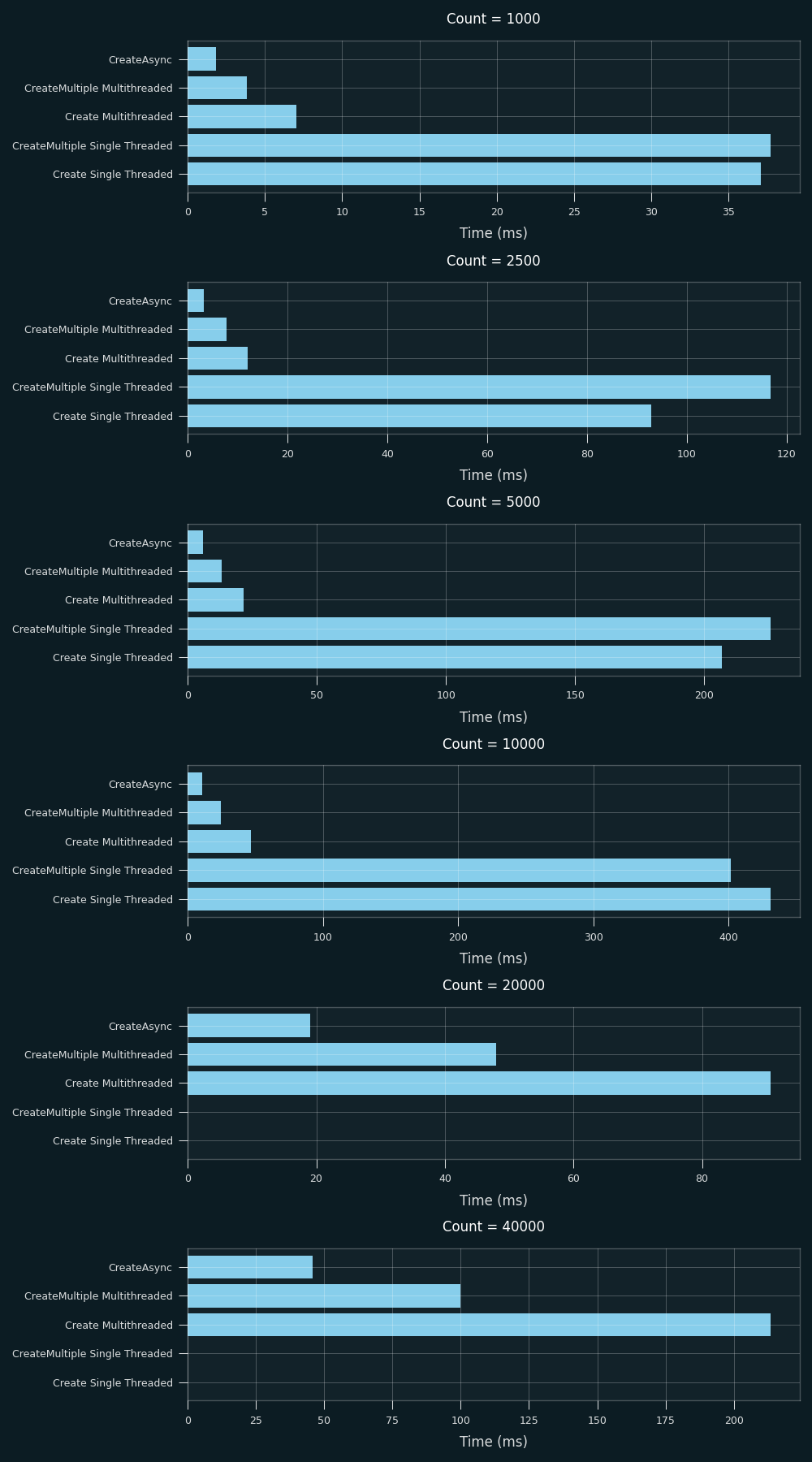 (tested with 10 degrees of parallelism)
The performance improvement from CreateAsync is insane - 2x or more faster than the threaded ExecuteMultiple - and I would expect that most developers using the SDK are writing in modern .NET6+ because they’re outside the platform, so you can probably take advantage of it!
One interesting tidbit that I noticed was that Mark’s article recommends the use of a value of 10 for the “degree of parallelism” value (aka how many tasks can be executed at once) whereas the Microsoft SDK optimization article recommends the use of the ServiceClient’s MaxDegreesOfParallelism value. For the above tests, I used a value of 10, but wanted to test with manually setting the degrees of parallelism and the effect that would have.
 (tested with 10000 record Create)
It seems that CreateAsync does not significantly change with more or less degrees of parallelism past around 20 - meaning you can probably get more out of the platform without causing impact for end users while operations run. Either way, I would only use manually set degrees of parallelism if you can guarantee that the user running operations against the system will be the only one (in a data migration or service worker / environment scenario, for example) In my environment, I preferred to use the MaxDegreesOfParallelism value as it’s dynamic and will be set by the system as required.
Performance tweaks - do they make a difference?
Reading through the Microsoft Learn article I linked above, I saw these configuration lines that change behaviours of the underlying System.Net and System.Threading libraries that are used by the ServiceClient. I wasn’t exactly sure if these made a difference, but I had just written a benchmarking application, so my first port of call was checking if they did.
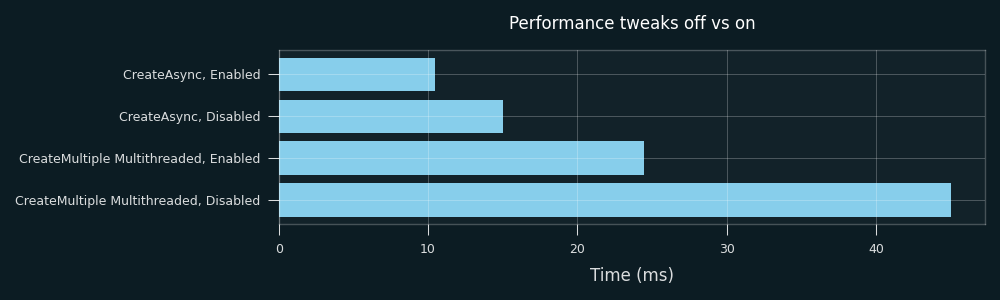 (tested with 10 degrees of parallelism, 10000 record Create)
They do seem to make a pretty significant difference. Especially if you’re not using CreateAsync (if you’re using .NET Framework for example), these could be a nice performance improvement that could be integrated into legacy applications very easily.
Downsides
With the traditional ExecuteMultipleRequest and Execute(), you can optionally get returned a collection of results with fault messages (admittedly with reduced performance). This is not possible with CreateAsync(), as the operation is run asynchronously. You get a bag of GUIDs at absolute maximum. For my use case, this was not an issue - the request still faults if you have an incorrect request or if something happens on the Dataverse side.
Conclusion
To wrap up, this is an awesome new (well, new for nearly two years ago) feature that you should be taking advantage of if you’re writing external SDK applications. For Azure Functions based integrations, this was an absolute game changer. As mentioned before, your mileage may vary and testing will reveal if this could give you a significant performance uplift.
Thank you for reading! Please take a look at my other post (from last year, I should really write more….) and feel free to reach out via email (click the @ symbol up the top, but do note I will reply in my personal capacity only and not on behalf of my employer) or comment below if you have any questions or concerns.